As an e-commerce seller, you can use your Global Account information in order to receive funds from your online store (including platforms such as Amazon, eBay, and Fnac) or from your merchants through SWIFT and/or local payment methods, depending on the collection capabilities of your Global Account.
We recommend checking your Global Account's collection capabilities and aligning that with the payout capabilities of your online store (usually by verifying this with your store's support team) to avoid any issues with receiving payouts into your global account.
For the New Airwallex WebApp Experience (Beta phase):
If you see "Business Accounts" in the left navigation column, you're on the new Airwallex experience. If you don't see this then please refer to steps outlined under "For the existing Airwallex Webapp Experience"
As an e-commerce seller, you can use your Global Account information in order to receive funds from your online store (including platforms such as Amazon, eBay, and Fnac) or from your merchants through SWIFT and/or local payment methods, depending on the collection capabilities of your Global Account.
We recommend checking your Global Account's collection capabilities and aligning that with the payout capabilities of your online store (usually by verifying this with your store's support team) to avoid any issues with receiving payouts into your global account.
Collection via your Global Account
To locate your Global Account information, please follow the steps below:
Step 1: Go to your Borderless cash account and select 'Global Accounts'
Step 2: Choose the specific Global Account you wish to view
Step 3: You will be able to see your account details here. If you require more information about the Global Account, click on 'Show all'. Additionally, on the right-hand side, you can access the 'Capabilities' for this Global Account.
For guidance on how to create Global Accounts, please refer to this guide instead.
For the existing Airwallex Webapp Experience:
If you don't see "Business Accounts" in the left navigation column, you're on the old Airwallex experience. You will be migrated to the new WebApp experience soon as we gradually roll it out.
Collection via your Global Account
To locate your Global Account information, please follow the steps below:
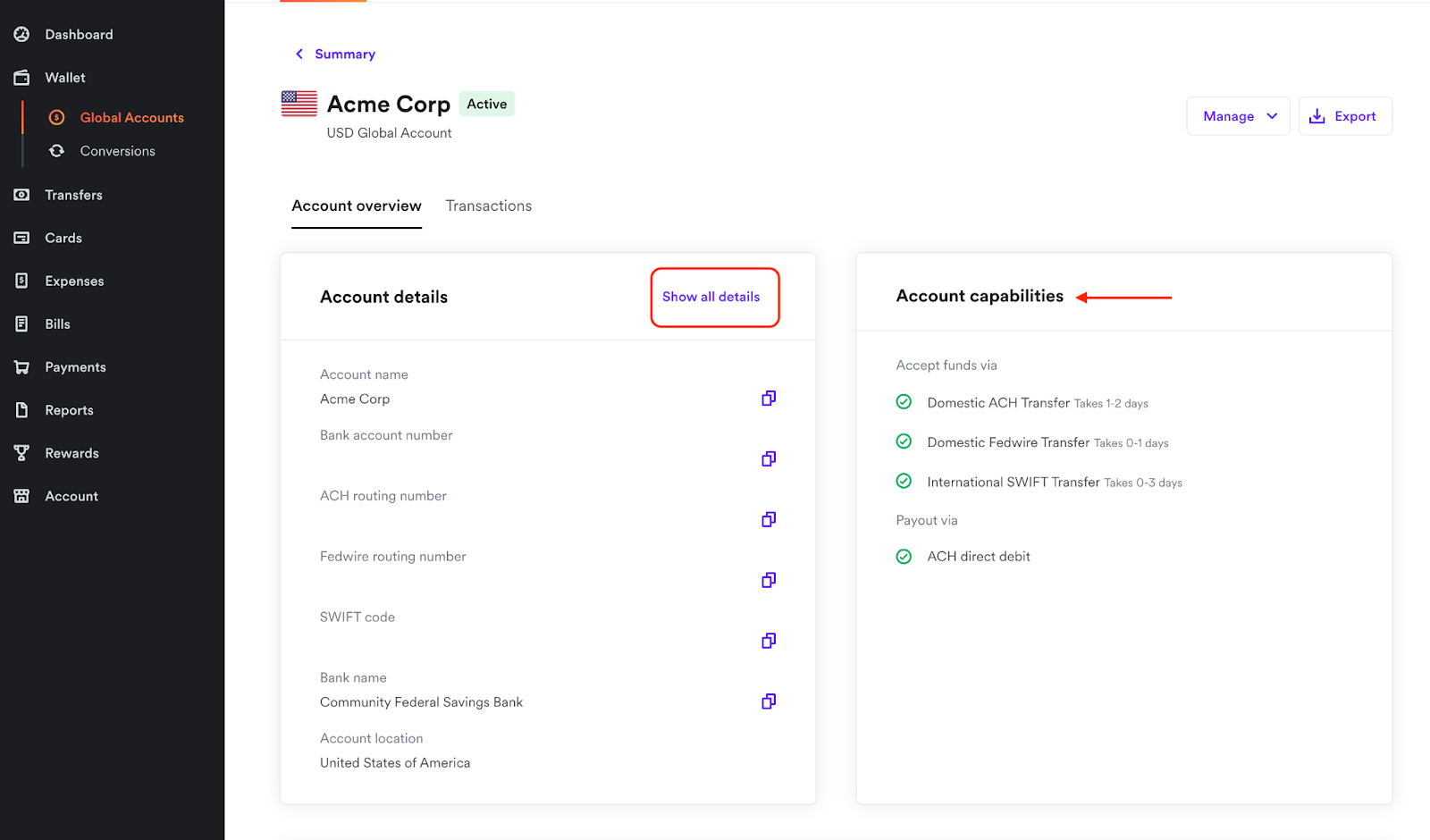
Step 1: Go to the 'Wallet' section and select 'Global Accounts'
Step 2: Choose the specific Global Account you wish to view
Step 3: You will be able to see your account details here. If you require more information about the Global Account, click on 'Show all details'. Additionally, on the right-hand side, you can access the 'Account Capabilities' for this Global Account.
For guidance on how to create Global Accounts, please refer to this guide instead.